
FIRESTICKIPTV.US
Installation Guide
Set up your premium IPTV subscription on Firestick, Android, iPhone, Samsung Smart TV, LG Smart TV, Windows PC and Mac in under 5 minutes. Step-by-step guide for IPTV Smarters Pro, TiviMate, IBO Player and 8K IPTV players — optimized for the best Firestick IPTV USA experience.
Install IPTV on Amazon Firestick
Complete Firestick IPTV installation guide for Fire TV Stick, Fire TV Stick 4K, Fire TV Stick 4K Max and Fire TV Cube. Install TiviMate, IPTV Smarters Pro, IBO Player or 8K IPTV apps in minutes.
1. Enable Unknown Sources
Open Firestick Settings
From your Firestick Home Screen, navigate to Settings.
Open Developer Options
Open My Fire TV then select Developer Options.
Enable Downloader Permission
Click Install Unknown Apps and enable Downloader.
2. Install Downloader App
Search Downloader
Open Find → Search then search for Downloader App.
Install & Open
Install Downloader and open it. You'll use it to enter the IPTV app code below.
3. Choose Your IPTV App
Open Downloader, enter one of the codes below and click Go. Choose the IPTV player you prefer — all support Xtream Codes API.
Premium IPTV player with smooth modern interface.
Popular IPTV app for Firestick and Android TV.
Fast IPTV player supporting Xtream Codes API.
Best quality IPTV streaming experience.
Premium optimized IPTV player.
Enhanced IPTV version with smooth playback.
Stable VIP IPTV player version.
High speed streaming optimized player.
Movies & TV Shows optimized player.
Smart TV optimized IPTV version.
4. Login To Your IPTV
Open Your IPTV App
Launch the IPTV player you just installed via Downloader.
Select Xtream Codes API
Choose Login with Xtream Codes API — this automatically loads EPG and Catch-Up features.
Enter Your IPTV Details
Enter the Username, Password and Server URL sent to you by FIRESTICKIPTV.US via WhatsApp or Email.
Start Streaming
Enjoy 120,000+ Live TV channels, Sports, Movies and TV Series instantly in crystal-clear 4K UHD.


Install IPTV on Android & iOS
Easy IPTV Smarters Pro setup guide for Android phones, Android TV, iPhone and iPad. Stream Firestick IPTV USA channels anywhere on mobile.
Download IPTV Smarters Pro
Install IPTV Smarters Pro on Android, iPhone or iPad — free official downloads below.
Login With Xtream Codes API
Open the app → Add User → choose Login with Xtream Codes API.
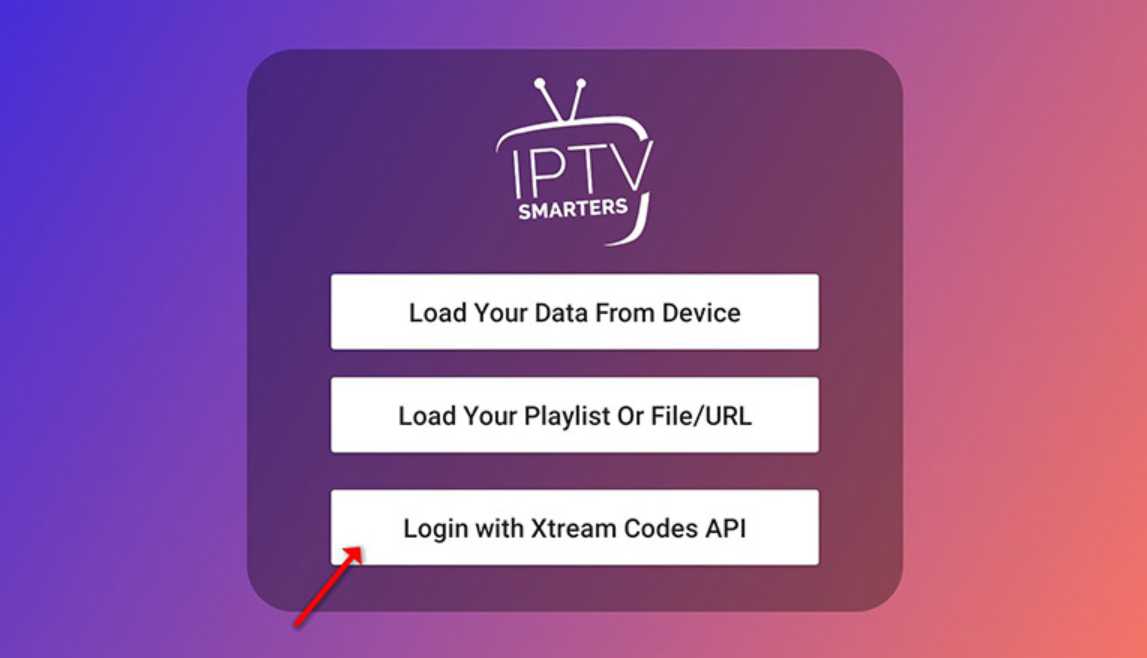
Enter IPTV Subscription Details
Enter your Username, Password and Server URL sent via WhatsApp or Email by FIRESTICKIPTV.US.
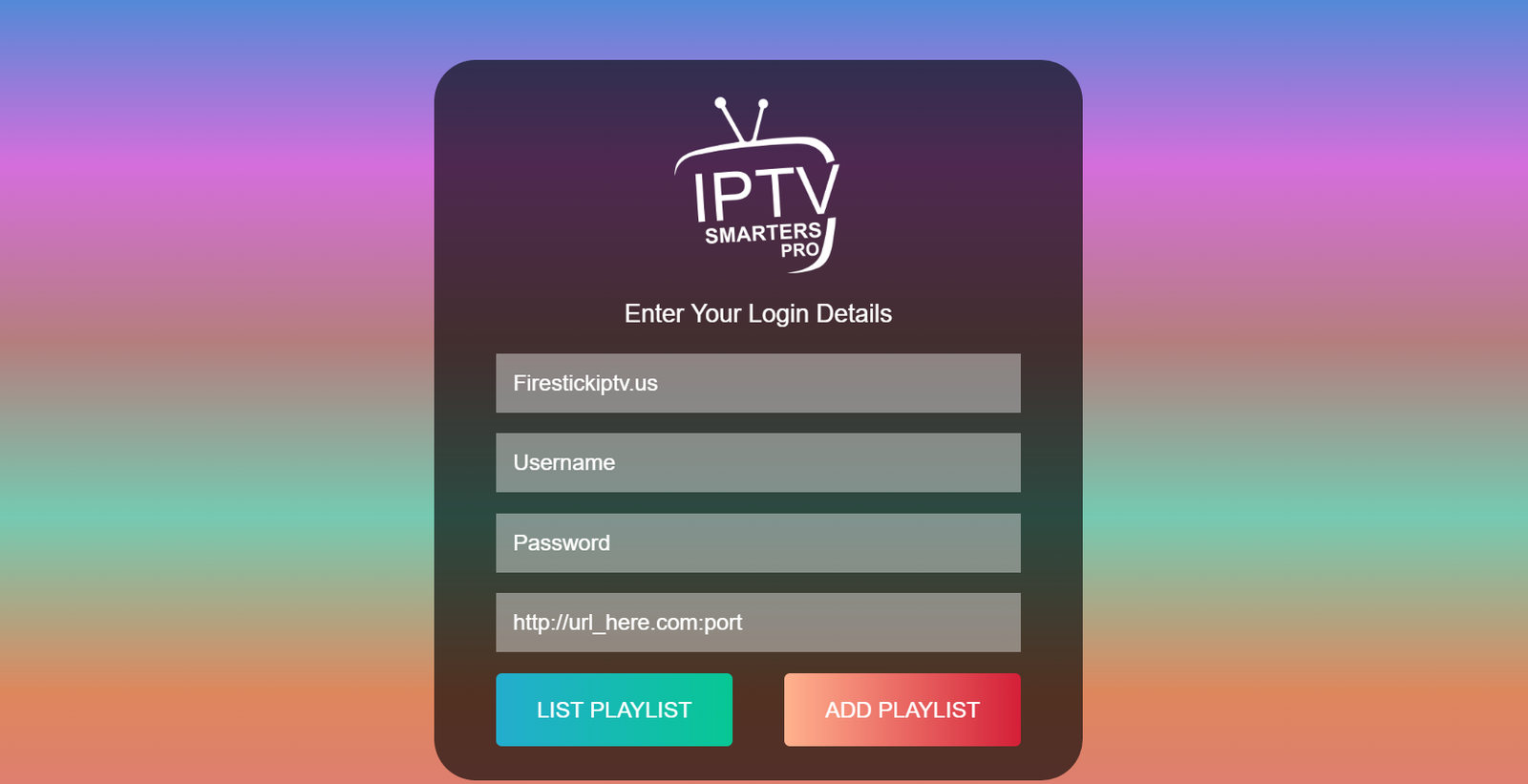
Wait For Playlist Loading
Wait a few seconds for all channels, movies and TV shows to fully load.
Open Live TV
Click on Live TV to access all IPTV channels.
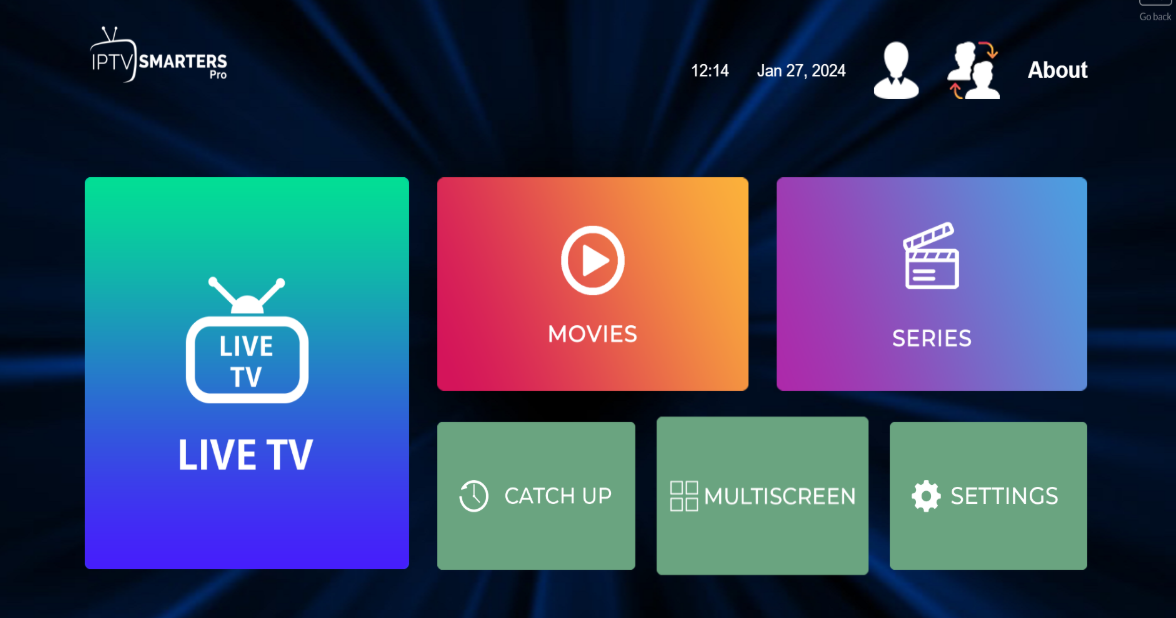
Select Channel Category
Choose Sports, Movies, USA Channels or any IPTV category you want to watch.
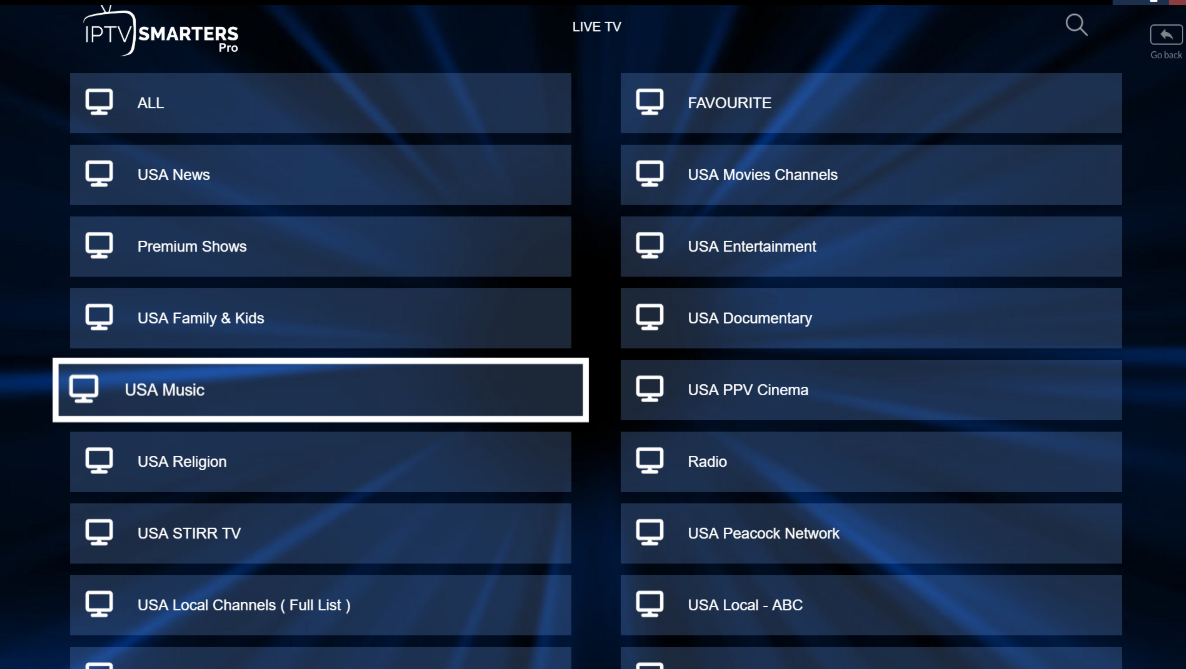
Start Streaming
Click any channel then fullscreen the player. Enjoy your Firestick IPTV USA subscription anywhere!
Add M3U Playlist (Alternative)
You can also add your IPTV using an M3U Playlist URL instead of Xtream Codes API — supported by all major IPTV players.

Install IPTV on Samsung & LG Smart TV
Complete IPTV Smarters Pro installation guide for Samsung Smart TVs and LG Smart TVs. Login with Xtream Codes API and stream Live TV, Sports, Movies and TV Shows instantly.
Samsung Smart TV Installation
Press the Smart Hub button on your Samsung remote.
Search for IPTV Smarters Pro and install the application.
Login using your IPTV Username, Password and Portal URL.
LG Smart TV Installation
Press the Home button then open LG Content Store.
Search and install IPTV Smarters Pro.
Login with your IPTV subscription details.
Open IPTV Smarters Pro
IPTV Smarters Pro is now installed on your Smart TV.
Accept the Terms of Use when opening the app for the first time.
Login With Xtream Codes API
Click on Add User then choose Login with Xtream Codes API.
Xtream Codes API automatically loads EPG and Catch-Up features.
Enter IPTV Subscription Details
Enter Playlist Name, Username, Password and Server URL sent via WhatsApp or Email.
Click on ADD USER.
Wait For IPTV Playlist Loading
Wait a few seconds for IPTV channels, Movies and TV Shows to load.
Open Live TV
Open the Live TV section to access IPTV channels.
Select Channel Category
Choose Sports, Movies, USA Channels or any IPTV category.
Start Watching IPTV
Click any channel and enjoy Live TV, Sports, Movies and TV Shows instantly.


Install IPTV on Windows & Mac
Complete IPTV Smarters Pro setup guide for Windows PC and Mac. Login with Xtream Codes API and watch Live TV, Sports, Movies and TV Shows instantly.
Download IPTV Smarters Pro
Download and install the official IPTV Smarters Pro app for Windows or Mac.
Login To IPTV Smarters Pro
Open the app and login using your IPTV Username, Password and Portal URL sent by your IPTV provider.
Accept Terms Of Use
When opening IPTV Smarters Pro for the first time, scroll down and click Accept.
Login With Xtream Codes API
Click on Add User then choose Login with Xtream Codes API.
Xtream Codes API automatically loads EPG and Catch-Up features.
Enter IPTV Subscription Details
Enter Playlist Name, Username, Password and Server URL sent via WhatsApp or Email.
Click on ADD USER.
Wait For IPTV Playlist Loading
Wait a few seconds for IPTV channels, Movies and TV Shows to load.
Open Live TV
Open the Live TV section to access IPTV channels.
Select Channel Category
Choose Sports, Movies, USA Channels or any IPTV category.
Start Watching IPTV
Click any channel and enjoy Live TV, Sports, Movies and TV Shows instantly.
Installation FAQ
Most asked questions about installing IPTV on Firestick, Smart TV, mobile and PC — answered to help you set up your Firestick IPTV USA subscription in minutes.
Installing IPTV on Firestick takes 3 minutes: enable Unknown Sources in Developer Options, install the Downloader app from the Amazon Appstore, enter the code for your preferred IPTV player (TiviMate, IPTV Smarters Pro or 8K Player), then login with the Xtream Codes API credentials sent by FIRESTICKIPTV.US.
TiviMate and IPTV Smarters Pro are the two best IPTV apps for Firestick in the USA. TiviMate offers the smoothest modern interface and best EPG, while IPTV Smarters Pro is the most popular and supports Xtream Codes API out of the box. 8K Player VIP+ is also excellent for true 4K streaming on Fire TV Stick 4K Max.
Open IPTV Smarters Pro, accept the Terms of Use, tap Add User, choose Login with Xtream Codes API, enter the Playlist Name, Username, Password and Server URL sent by FIRESTICKIPTV.US, then tap ADD USER. Channels load in seconds — start streaming Live TV, Sports and Movies right away.
Yes. Samsung Smart TVs fully support IPTV. Press the Smart Hub button, search for IPTV Smarters Pro in the app store, install it, and login with your Xtream Codes API credentials. Works on every Samsung Smart TV released after 2017.
On iPhone or iPad, download IPTV Smarters Pro (Smarters Player Lite) from the Apple App Store, open the app, tap Add User, choose Xtream Codes API and enter your credentials. Stream the full Firestick IPTV USA subscription anywhere on iOS.
Yes. IPTV Smarters Pro offers official Windows and Mac desktop apps. Download from iptvsmarters.com, install, login with Xtream Codes API and enjoy the full IPTV experience on PC, laptop, MacBook or iMac with multi-screen support.
Less than 5 minutes on any device. After you receive your IPTV credentials from FIRESTICKIPTV.US via WhatsApp (usually within minutes of payment), the actual app install and login takes 2–3 minutes. You'll be streaming Live TV almost immediately.
In any IPTV player (TiviMate, IPTV Smarters Pro, IBO Player, 8K Player), choose Login with Xtream Codes API. Enter three fields: Username, Password and Server URL (also called Portal URL or Host). These three values are sent to you by FIRESTICKIPTV.US.
Xtream Codes API is the standard authentication system used by premium IPTV providers worldwide. It automatically loads your full channel list, EPG TV guide, catch-up replay, movies and TV shows in one login — no manual M3U URL needed. Every modern IPTV player supports it.
Yes. TiviMate is one of the most recommended IPTV apps for Firestick. Install it via Downloader code 272483, then login with Xtream Codes API. TiviMate offers the most modern, polished IPTV interface and works perfectly on all Fire TV devices including the Fire TV Stick 4K Max.
A VPN is not required to use IPTV on Firestick. Many USA users still use one for extra privacy or to keep their ISP connection stable. FIRESTICKIPTV.US streams are fully optimized to run smoothly with or without a VPN.
After your payment is confirmed, FIRESTICKIPTV.US delivers your IPTV credentials — Username, Password and Server URL — via WhatsApp or Email within minutes. Contact us on WhatsApp anytime if you need help retrieving or resetting your login.
Need Help? Get Instant IPTV Support
Contact FIRESTICKIPTV.US support on WhatsApp or Telegram for instant IPTV installation help, troubleshooting, or to activate your premium Firestick IPTV USA subscription in minutes.